Dynamic DNS Services - 100% FREE for all Top Level Domains
Note: We don't provide static IPs. Our DynDNS simply link your dynamic IP to a static domain name. Thus, you can access the network with the domain name no matter how the IP changes.
Easily Update Dynamic IP Addresses Using cURL
On Windows, Mac, or Linux, schedule a task to execute the following curl command at regular intervals. cURL, which stands for client URL, is a command line tool that developers use to transfer data to and from a server. Curl is typically included in most operating systems. It has been a part of Windows since the release of Windows 10 build 1803 in early May 2018. If the command is not present on your machine, you'll need to install it.
Note: Simply add the parameter -d ip=xx.xx.xx.xx to override the updated IP(IPv4 or IPv6). Please make sure your update interval is more than 4 minutes.
Using this command, our system will automatically identify your public IP address and update your hosts to the new IP. Alternatively, you can include the parameter -d ip=xx.xx.xx.xx to overwrite the public IP. For multiple hosts, simply separate them with a comma. The API Key can be created at your account Dashboard -> Settings
The return is JSON file with a successfull update like:
{"code" : 0, "message" : "Success - some details about the update"}
code:0 indicates successfull updates while code:1 indicates IP address not changed. Other returning codes indicates errors.
To make your work easier, you may simply click on the following button to start your automatic updates to your IP
To test how it works on browsers, you can simply paste the following URL adress to a web browser:
Note: You need to replace the API-KEY and hostname with your own api key and hostname
curl (short for "Client URL") is a command line tool that can communicates with a web server with a relevant URL. Or in other words, it is just like a text based web browser. The curl command is built in most Operating Systems including Linux, Unix, MacOS, and Windows (sinc Windows 10 ). If your windows does not have curl command, you can refer to
install curl on windows
to learn how to install it.
What is Dynamic DNS?
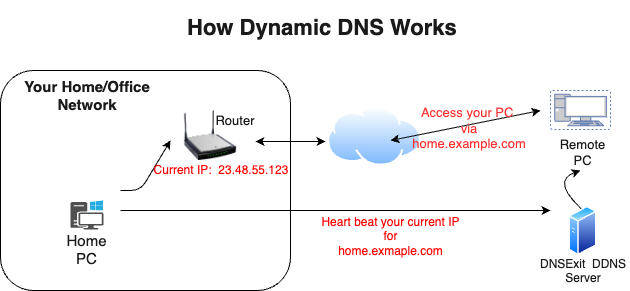
Dynamic DNS makes a dynamic IP address act like it is a static IP address, meaning it does not change. It does this by utilizing a hostname and our Dynamic Update Client to keep your hostname updated with the correct IP address.
Note: Besides the easy-to-use web interface to manage your DNS, We also provide
DNS API Document
to update your DNS records remotely.
How to Start your Dynamic DNS ?
1. Sign up an account
First you need to Sign Up a free account to create DNS for your domains and updating your IP addresses by IP Update clients.
2. Register a new or use an existing domain name for dynamic DNS
a)If already got a domain name, you can skip this step. However, you do need to change the
name servers of the domain to our name servers so that our name servers are in charge of resolving IPs for your domain.
b) To start with your dynamic DNS experience, you may simply use our Free Domains.
c) You want to choose your own domain name for your dynamic DNS, you can find an available domain name and registere it.
3. Create DNS for the Domain
Now the domain has been registered or you have switched your existing domain's name servers to our name servers:
Next, you need to Setup DNS for the domain. The DNS (Domain Name Systems) is the internet
service that translates your domain names into IP addresses.
4. Automatic Dynamic IP Updates
To update domain DNS, you can simply login to your member account
to edit DNS for the domain. However, to update your IP address automatically, you need to check
our dynamic
IP update protocols and clients
to know how to automatically update your latest IP address to our name servers.
If you are running Window NT or Linux/Unix, you can use command
nslookup to check your IP settings of your hosts at dnsExit.com name servers.
Under DOS prompt(Windows) or shell prompt(Linux/Unix), type command nslookup;
then specify the name server as ns1.dnsExit.com; finally type one of the host names
in your DNS records. You should see the IP of the host displayed on the screen.
> nslookup
> server ns1.dnsExit.com > hostname.yourdomain.com